DATA WAREHOUSEDATA PLATFORMBIGQUERYDREMIOSNOWFLAKE
Not your typical Data Warehouse — a tech dive into modern data platforms
Introduction
This is the first one from series of articles from Insightify.io about
modern data platforms. We are
kicking off with a high-level overview of three tools of the trade we use on
daily basis.
Treat it as a starter, as we are cooking some deep dive arts into more
detailed features & the tech
behind those tools.
Data warehouses and data lakehouses are crucial components of modern data
management, providing a
centralised repository for storing and managing large volumes of structured
and unstructured data. In
this article, let us take a look at BigQuery and Snowflake, which are not
your typical cloud-based
data warehouses, and Dremio — a platform that facilitates access to data
from various sources without
the need for data movement, distinguishing it from traditional warehouse
solutions.
Why these three?
BigQuery is arguably the most mature and performant
serverless data warehouse
solution from
prominent cloud providers.
Snowflake is cloud-agnostic, scales easily and suits
best for companies with a
multi-cloud
architecture.
Dremio is the only open-source representative here
which offers similar
cloud-agnostic
capabilities, but without a vendor-lock.
Overview
BigQuery, Google Cloud’s fully managed, serverless data warehouse, offers a
wide range of capabilities
for storing, querying, and analysing large datasets. Some of the key
possibilities and features
include:
Scalability: BigQuery is designed to handle petabytes
of data, making it suitable
for organisations of any size. It automatically scales to accommodate
growing data volumes without
the need for manual provisioning or management.
Serverless: With BigQuery, users can focus on analysing
data rather than managing
infrastructure. It eliminates the need for managing servers, ensuring
high availability and
reliability without the overhead of infrastructure maintenance.
Scalability: BigQuery enables real-time analytics with
features like streaming
inserts and continuous queries. This allows organisations to analyze and
derive insights from
streaming data as it arrives.
Standard SQL: BigQuery supports standard SQL for
querying data, making it
familiar and accessible to SQL users. It also offers advanced SQL
functionality for complex
analytics tasks.
Machine Learning Integration: BigQuery ML allows users
to build and deploy
machine learning models directly within BigQuery using SQL queries. This
simplifies the process of
incorporating machine learning into data analysis workflows.
Advanced Analytics: BigQuery offers advanced analytics
capabilities, including
window functions, arrays, and user-defined functions, enabling complex
data manipulation and
analysis.
Snowflake is a cloud-based data warehousing platform that offers a range of
capabilities
for storing, processing, and analyzing data. Here’s a short overview of
Snowflake’s possibilities:
Scalability: Snowflake is designed to handle large
volumes of data, ranging from
gigabytes to petabytes,
with built-in scalability that automatically adjusts to workload
demands.
Multi-cluster architecture: Snowflake’s multi-cluster
architecture enables
concurrent workloads without
performance degradation, allowing users to run multiple queries and
workloads simultaneously.
Separation of storage and compute: Snowflake separates
storage and compute
resources, allowing users to
independently scale each component based on their needs. This
architecture provides flexibility and
cost efficiency by only paying for the resources consumed.
Support for semi-structured data: Snowflake natively
supports semi-structured
data formats like JSON, Avro, Parquet,
and XML, enabling users to store and analyse diverse data types without
requiring preprocessing.
However, the way how Snowflake represents semi-structured data is
somewhat unique and might be a bit
tricky at first.
Data sharing: Snowflake facilitates easy and secure
data sharing between
organisations, departments, or
partners through its built-in data sharing capabilities. Users can share
live data without copying
or moving it, maintaining data consistency and integrity.
Dremio is a data-as-a-service platform that offers a range of capabilities
for data discovery,
integration, and analytics. Here’s a short overview of Dremio’s
possibilities:
Self-service data access: Dremio enables self-service
data access for users across the organisation, allowing them to discover
and explore data from various sources without relying on IT or data
engineering teams.
Data virtualisation: Dremio provides data
virtualisation capabilities, allowing users to query and analyse data
from multiple sources in real-time without the need to copy or move
data. This simplifies data access and reduces data duplication.
Unified semantic layer: Dremio offers a unified
semantic layer that abstracts the complexities of underlying data
sources, providing a consistent interface for querying and analysing
data regardless of its location or format.
Data acceleration: Dremio accelerates data access and
query performance through its distributed query engine, which leverages
advanced techniques like query pushdown, columnar caching, and parallel
processing to optimise query execution.
Native SQL support: Dremio supports standard SQL for
querying and analysing data, making it familiar and accessible to SQL
users. It also provides support for advanced SQL features and functions
for complex analytics tasks.
Data lineage and cataloging: Dremio offers data lineage
and cataloging capabilities, allowing users to track the origin and
lineage of data, as well as cataloging metadata for improved data
discovery and governance.
Architecture & Initial Setup
BigQuery
Serverless: One of BigQuery’s most significant
advantages is its fully serverless offering. This means that users don’t
need to worry about provisioning or managing any infrastructure.
BigQuery automatically scales computing and storage resources as needed
without any manual intervention. Users can start analyzing their data
immediately without considering compute instance sizes or resource
allocation.
Ease of Setup: Setting up BigQuery involves creating a
project in Google Cloud Platform (GCP), enabling the BigQuery API, and
starting to load or query data. The process is streamlined and designed
to minimise the initial configuration overhead.
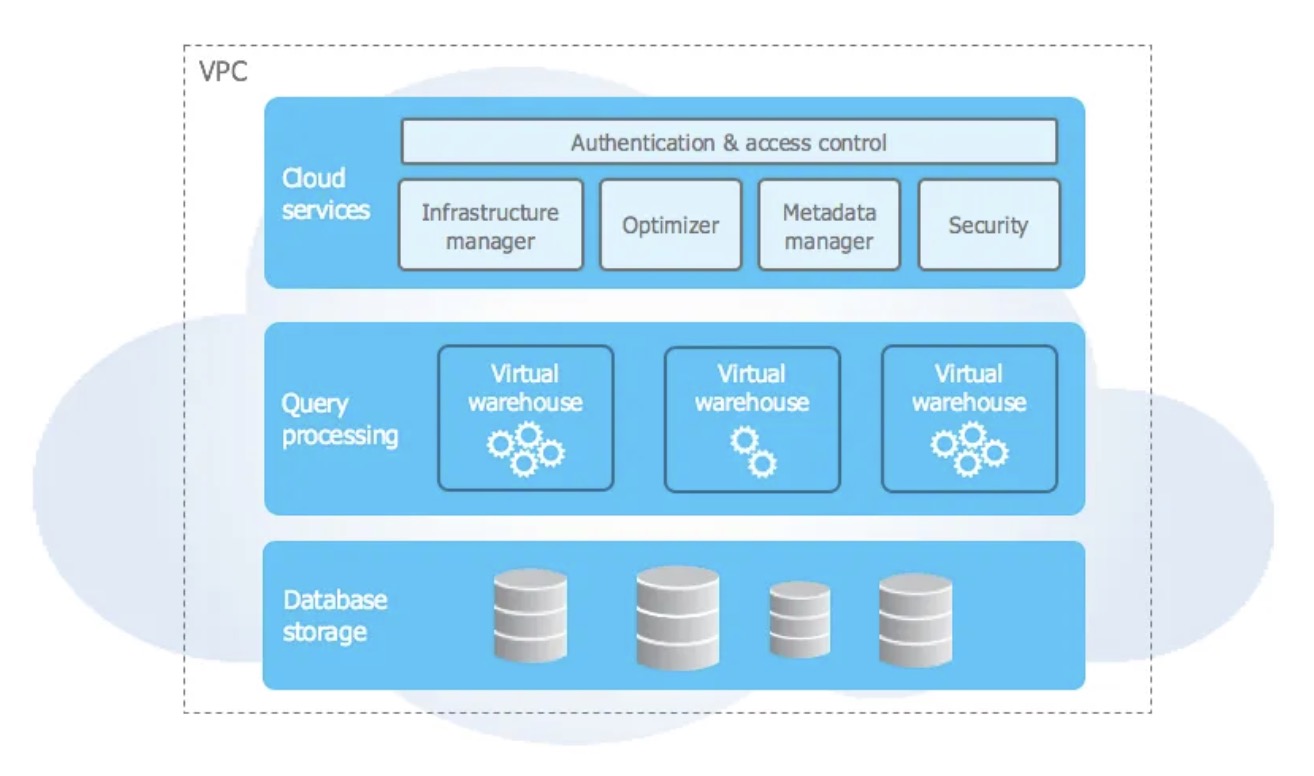
Semi-managed: While Snowflake abstracts a lot of the
infrastructure management and offers a more straightforward approach to
data warehousing than traditional options, it still requires some
initial setup regarding compute resources. Users need to choose and
configure virtual warehouses, which are essentially compute clusters, to
execute their workloads. These warehouses can be scaled up or down based
on demand, but this scaling often requires user intervention or
auto-scaling policies to be set up in advance.
Resource and Warehouse Configuration: Initial setup in
Snowflake includes setting up data storage containers (databases), and
compute resources (warehouses), and configuring roles and permissions.
This setup process provides flexibility but also requires
decision-making from the user about the size and scale of the compute
resources.
Configurable Environment: Dremio also requires a bit
more setup compared to BigQuery. It is designed to run on top of
existing data lakes and offers capabilities to optimise and manage data
queries directly on those data sources. The initial setup involves
deploying Dremio on your chosen environment (cloud or on-premises),
configuring the clusters, and connecting to your data lake storage.
Cluster Management: Users need to manage and scale the
Dremio clusters according to their workload requirements. This process
includes setting up the software, choosing the hardware or virtual
machine types, and scaling resources as necessary. Dremio offers
flexibility in how data is accessed and queried, but this comes with a
need for more hands-on management and configuration.
Methods: BigQuery supports various data loading
methods, including batch loading from Google Cloud Storage, streaming
inserts for real-time data ingestion, and transfer services from
external sources like Google Ads, Google Sheets, and third-party SaaS
applications.
Formats: It can ingest a wide range of formats,
including CSV, JSON, Avro, Parquet, and ORC.
Serverless Nature: The serverless architecture means
there’s no need to manage resources for data loading. However, there are
quotas and limits on streaming inserts to consider.
Ease of Use: Loading data is generally straightforward,
with support for automatic schema detection and the ability to load data
directly from the Google Cloud Console, command-line tool (bq command),
or client libraries.
Snowflake
Methods: Snowflake allows data loading through batch
loading from cloud storage services (Amazon S3, Google Cloud Storage,
Azure Blob Storage), Snowpipe for continuous, near-real-time data
ingestion, and third-party data integration tools.
Formats: Supports a variety of file formats, including
CSV, JSON, Avro, Parquet, ORC, and XML with a variant
data type. This capability is powerful but can initially seem
odd compared to strongly typed data structures in BiqQuery. The lack of
strong typing enables users to store and query data with schema-on-read
approach. Snowflake dynamically interprets the schema, allowing users to
access nested elements directly through path expressions or functions.
However, this flexibility may require users to have a deeper
understanding of their data structures for effective
querying and analysis. What’s more, the responsibility for managing data
integrity shifts from the database system to the application logic.
Virtual Warehouse: The compute resources (virtual
warehouses) must be sized appropriately for the data loading process, as
they affect the speed and efficiency of data ingestion.
Stage and Load: The typical process involves staging
files in cloud storage, then using SQL commands or Snowflake’s Web UI to
load the data. Snowpipe automates this process for continuous ingestion.
Dremio
Methods: Dremio is designed to work directly on top of
data lakes, allowing users to query data in place without the need to
load it into a separate storage system. However, for optimised
performance, Dremio can cache data using reflections.
Direct Querying: It primarily accesses data directly
from data lake storage (e.g., Amazon S3, Azure Data Lake Storage, HDFS)
without the traditional load process.
Reflections: Dremio’s reflections can be used to
accelerate query performance on frequently accessed data, which involves
creating optimised representations of the original data. Data is
converted to Apache Iceberg and queries are routed to this version
instead of reaching raw data.
Flexibility: Provides a flexible approach to handling
data, focusing on minimising data movement and duplication. However,
users need to manage and configure reflections for optimal performance.
Performance & Optimisation
BigQuery
Performance: BigQuery’s serverless nature allows for
high performance without the need for manual tuning. It leverages
Google’s private fiber network and Dremel technology to execute queries
rapidly across massive datasets.
Optimisation: BigQuery automatically manages and
optimises query execution. It also offers features like materialised
views and partitioned tables to speed up query performance. BigQuery’s
BigQuery ML enables machine learning models to be built and executed
directly within the data warehouse, optimizing for predictive analytics
tasks.
Snowflake
Performance: Snowflake’s architecture allows for the
independent scaling of compute resources, which means performance can be
adjusted based on workload demands. Its caching mechanism stores query
results, reducing the time for subsequent queries.
Optimisation: Snowflake provides automatic clustering
(re-clustering) to optimise the organisation of data in storage, which
enhances query performance. Users can also utilise Snowflake’s Resource
Monitors to track and limit computing resources, ensuring that
performance is aligned with budget constraints.
Dremio
Performance: Dremio excels in querying directly on data
lakes, minimising data movement. Its use of Apache Arrow for in-memory
data processing significantly speeds up query response times. If you
intend to use it on large datasets in not optimal format e.g. JSON/CSV
files the performance won’t be optimal and you will end up converting
data to Apache Iceberg using either Dremio Reflections or building
pipeline yourselves.
Optimisation: Dremio’s reflections (materialised views)
allow for automatic optimisation of queries by creating optimised data
structures (Apache Iceberg) for frequently accessed data. Dremio also
offers a query planner that optimises queries before execution, and its
engine can scale resources horizontally based on workload requirements.
Performance Tip: Dremio advertises it’s platform as
capable of performing well without the need for data movement meaning if
you have data available in different formats and locations. Based on our
expertise, it’s only valid for relatively small
datasets. To work at scale, you will need to build
pipelines to convert data to Apache Iceberg. This step diminishes the
advertised advantage of no data movement.
Security & Compliance
BigQuery
Security Features: BigQuery integrates seamlessly with
Google Cloud’s comprehensive security model, including IAM (Identity and
Access Management) for fine-grained access control, encryption at rest
and in transit, and private connectivity options through Google’s VPC
Service Controls. It also supports customer-managed encryption keys
(CMEK) for enhanced data protection.
Compliance: BigQuery is compliant with major global,
regional, and industry-specific standards, such as GDPR, HIPAA, ISO/IEC
27001, and SOC 1/2/3, among others. This wide range of compliance
certifications makes it a viable option for various industries,
including healthcare, finance, and public sectors.
Snowflake
Security Features: Snowflake provides a robust set of
security features, including always-on encryption of data at rest and in
transit, support for customer-managed keys, and multi-factor
authentication. Its role-based access control system enables detailed
permission settings for different users and groups. Snowflake also
offers features like network policies and private connectivity (via AWS
PrivateLink or Azure Private Link) to control access to data.
Compliance: Snowflake maintains compliance with a broad
array of standards, including SOC 1/2, PCI DSS, GDPR, HIPAA, and
FedRAMP, making it suitable for a wide range of regulatory requirements.
Its commitment to security is designed to meet the needs of highly
regulated industries.
Dremio
Security Features: Dremio emphasises security through
features like encryption at rest and in transit, integration with
Kerberos for authentication, and support for LDAP and Active Directory.
It also provides fine-grained access control at the dataset level,
allowing organisations to manage who can access specific data within
their data lakes.
Compliance: While Dremio’s compliance certifications
might vary based on the deployment model (cloud or on-premises) and the
underlying data storage system, it is designed to support compliance
with standards like GDPR and HIPAA through its security features.
Organisations are encouraged to ensure compliance based on their
specific deployment and data storage choices.
Cost Management
BigQuery
BigQuery offers a pay-as-you-go pricing model, which means you only pay for
the amount of data you process. There is also capacity-based pricing, you
can reserve defined number of slots (essentially virtual cpus) which are
available to you and you are charged for every second of using them.
The former is easy and relatively cheap to start with, but you need to
carefully query your data and fully utilise partitioning in order not to
bump your costs exponentially. It might be difficult to predict what would
be the final cost of using it. On the other hand the latter is predictive in
terms of expected bill, but it’s relatively expensive for smaller
organisations.
On top of it there is also the cost of storing data in BigQuery is $0.02 per
GB per month, and the cost of querying data is $5 per TB. BigQuery also
offers a free tier that includes 1 TB of querying per month and 10 GB of
storage.
Snowflake
Snowflake offers a pay-as-you-go pricing model, which means you only pay for
the amount of data you process. The cost of storing data in Snowflake is $23
per TB per month, and the cost of querying data is $40 per TB. Snowflake
also offers a free trial that includes $400 of credit for 30 days.
Dremio
Dremio offers a free community edition and a paid enterprise edition. The
community edition is free to use and includes all the features of the
enterprise edition, but with some limitations. License is free, but not
computing resources utilised to run Dremio e.g. AWS EC2 instances.
Enterprise edition is priced at $0.39/DCU. Dremio Consumption Unit is the
unit used to measure consumption on the Dremio platform. The number of DCUs
consumed is based on compute engine size and engine running time, measured
on a per-second basis.
Scalability
BigQuery and Snowflake both provide automatic scaling capabilities, while
Dremio offers semi-automatic scaling. BigQuery and Snowflake can scale up to
petabyte-scale data, while Dremio can scale up to terabyte-scale data.
Performance
BigQuery and Snowflake both provide high-performance query processing, while
Dremio provides interactive query performance. BigQuery and Snowflake both
provide columnar storage, while Dremio provides row-based storage.
Ease of Use
BigQuery, Snowflake and Dremio
provide web-based consoles for managing data. Since Dremio uses object
storage as a primary storing location, it is more demanding to wrap your
head around it’s UI and ways of working with data especially if you are
familiar with working with more traditional data warehouses.
Use Cases
BigQuery
BigQuery is ideal for
organisations that need to process large volumes of data quickly and they
already have the GCP infrastructure. It is well-suited for ad-hoc analysis,
machine learning, and real-time analytics. It is easy to use and start with.
If your organisation have a lot of data it might be the initial choice.
Snowflake
Snowflake is ideal for
organisations that need to process large volumes of data with high
concurrency. It is well-suited for data warehousing, data sharing, and data
lake integration. Data sharing capabilities excels other too competitors so
you envision a lot of it, Snowflake could be the best choice. It requires
more knowledge in an organisation to manage workloads and properly size
warehouses.
Dremio
Dremio is ideal for smaller
organisations which may want to explore data more since you are not limited
to building pipelines to load data to data warehouse first before starting
exploration. With Dremio you can query data in other databases like MySQL,
object storages like S3, Google Cloud Storage, NoSQL databases without a
need for building anything upfront. Except setting up proper connections of
course.
Conclusion
BigQuery, Snowflake, and Dremio are all powerful data warehousing tools that
provide unique features and capabilities on sturdy architectures. At
Insightify, we have avid supporters of all three platforms & have seen them
in prod action hundreds of times & never falling flat.
Yet, as much as we are aware the proof is in the pudding, and the choice of
data warehousing tools is not your typical SaaS subscription 50$/mo
purchase, we are already cooking more in-depth arts that will uncover the
tech specifics of the whole three. Until then!
At insightify.io, we help organisations
start their journey with building Data Lakes/Data Warehouses solutions, and
then some. Don’t hesitate to contact
us to get more info!